Antoine, you just told us to get rid of the threading mindset and now’re going to look into dispatching to different threads?
I know, confusing, right? But I still want you to understand how work is being dispatched under the hood. You should not try to force work to be running on a specific thread, let Swift take care of that. You should however know what’s going on behind the scenes to better understand performance implications.
Will a task always run on a background thread?
Let me start by saying an actor’s execution context can influence the answer. By default, tasks are scheduled on Swift’s cooperative thread pool, which usually means they will run on a background thread.
The most common example to illustrate a task running on the main thread is when using the @MainActor:
@MainActor
func updateUI() {
    /// Task inherits execution context from the `updateUI()` method.
    /// Since it's attribute with `@MainActor`, this task will run on the main thread.
    Task {
        print("Running on the main thread")
    }
}
The inner task inherits the execution context from the updateUI() method and executes on the main thread. We can demonstrate this further by calling another asynchronous method from inside the @MainActor attributed task:
@MainActor
private func updateUI() {
    /// Task inherits execution context from the `updateUI()` method.
    /// Since it's attribute with `@MainActor`, this task will run on the main thread.
    Task {
        print("Starting on the main thread: \(Thread.current)")

        /// Suspension point:
        /// - Main thread will be released for other work
        /// - This task will resume later when the background task completes.
        await someBackgroundTask()

        /// Returning on the main thread.
        print("Resuming on the main thread: \(Thread.current)")
    }
}

/// There's no `@MainActor` attribute here, so this method will run on any of the available
/// background threads.
private func someBackgroundTask() async {
    print("Background task started on thread: \(Thread.current)")
}
This code example will print out the following:
Starting on the main thread: <_NSMainThread: 0x6000017000c0>{number = 1, name = main}
Background task started on thread: <NSThread: 0x6000017acc40>{number = 8, name = (null)}
Resuming on the main thread: <_NSMainThread: 0x6000017000c0>{number = 1, name = main}
The someBackgroundTask() will run independently and does not inherit execution context. It’s a new child task that decides on its own where to run. If it were to be attributed with @MainActor as well, it would also run on the main thread. However, it’s guaranteed to run on a background thread in this case.
New behavior in Swift 6.2
It doesn’t make it easier to familiarize yourself with Swift Concurrency, but significant changes were introduced in Swift 6.2. One affects the above example and results from SE-461: Run nonisolated async functions on the caller’s actor by default.
Let me quote the introduction of the proposal:
Swift’s general philosophy is to prioritize safety and ease-of-use over performance, while still providing tools to write more efficient code. The current behavior of nonisolated async functions prioritizes main actor responsiveness at the expense of usability.
This proposal changes the behavior of nonisolated async functions to run on the caller’s actor by default. It introduces an explicit way to state that an async function always switches off an actor to run.
This means that the above code example may actually yield a different outcome. The key here is whether the method is non-isolated.
Enabling the new behavior
Luckily, this new behavior is currently opt-in. However, as with all upcoming features, they will eventually become part of the core language. Therefore, it’s wise to consider switching over. In Xcode 26, you can enable this behavior with the upcoming feature flag NonisolatedNonsendingByDefault:
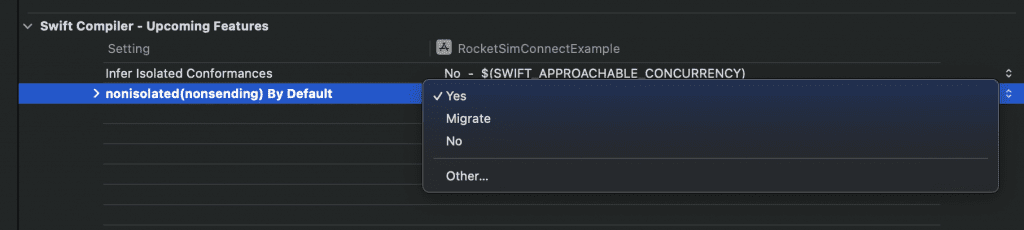
To start using the new behavior, you need to enable an upcoming feature.
Once enabled, the behavior of nonisolated asynchronous methods will change.
Note
Swift 6.2 introduces a new swift package migrate command line tool which you can use to enable ánd migrate automatically. More on this will be shared in the migration module of this course.
Looking at an example to better understand the new behavior
To illustrate an example, I’ve created another demonstrator inside the code example project:
@MainActor
struct NewThreadingDemonstrator {

    func demonstrate() async {
        print("Starting on the main thread: \(Thread.currentThread)")
        // Prints: Starting on the main thread: <_NSMainThread: 0x6000006b4040>{number = 1, name = main}

        let notSendable = NotSendable()
        await notSendable.performAsync()

        /// Returning on the main thread.
        print("Resuming on the main thread: \(Thread.currentThread)")
        // Prints: Resuming on the main thread: <_NSMainThread: 0x6000006b4040>{number = 1, name = main}
    }
}
The NotSendable type looks as follows and has a nonisolated performAsync method:
class NotSendable {

    func performAsync() async {
        print("Task started on thread: \(Thread.currentThread)")
        // Old situation: Task started on thread: <NSThread: 0x600003694d00>{number = 8, name = (null)}
        // New situation: Task started on thread: <_NSMainThread: 0x6000006b4040>{number = 1, name = main}
    }
}
As you can see from the comments, the new situation results in the method being called on the caller’s isolation domain. In other words, it will run on the main thread instead of a background thread once you’ve enabled the upcoming feature.
While this will make future adoption of Swift Concurrency easier, it might make things more confusing for those already a bit familiar with concurrency today. We’re basically asked to explicitly opt-out to isolation inheritance by attributing our method with the @concurrent attribute:
@concurrent
func performAsync() async {
    print("Task started on thread: \(Thread.currentThread)")
    // Task started on thread: <NSThread: 0x600003694d00>{number = 8, name = (null)}
}
This instructs to always switch away from the caller’s isolation domain and brings back the previous behavior.
Using nonisolated(nonsending)
You might have seen this issue popping up here and there:
 Sending value of non-Sendable type ‘MyType’ risks causing data races
I’ve had it recently as well:

This issue mostly pops up when the upcoming feature mentioned above is turned off. Async methods won’t use the same isolation domain as their callers, which means they automatically send values between actor-isolated and local isolation domains.
It’s a case per case scenario how you should solve this. You can either mark your type as Sendable, but you can also make use of nonisolated(nonsending) to prevent a value from being send to a different isolation domain.
nonisolated(nonsending) func storeTouch(...) async
In my case, it was fine to use the callee’s actor isolation. I did not intent to execute the store touch method in the background as it’s not a heavy operation. In other words, I’m happy to let it block the callee’s isolation domain until it returns.
How to check the current thread for a task
In case you ever want to verify on which thread a task is running, you can pause program execution (Debug → Pause) and look at the Debug Navigator:
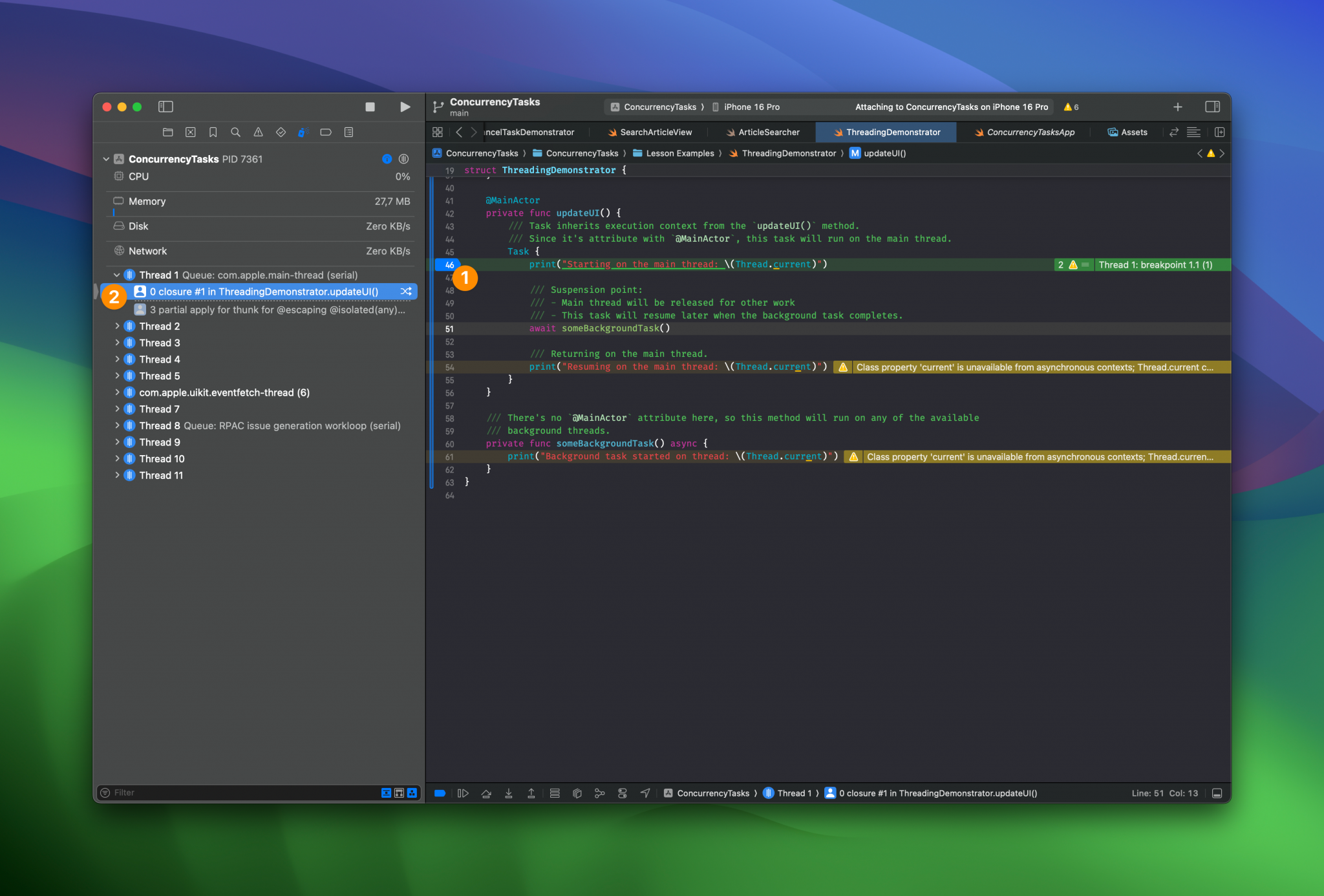
You can see that we’ve added a breakpoint at a code line inside our task (1) and the thread overview shows that it’s running on com.apple.main-thread (2). You can also make use of the following extension on Thread as you’ve might have seen throughout the sample projects:
extension Thread {
    /// This is a workaround for compiler error:
    /// Class property 'current' is unavailable from asynchronous contexts; Thread.current cannot be used from async contexts.
    /// See: https://github.com/swiftlang/swift-corelibs-foundation/issues/5139
    public static var currentThread: Thread {
        return Thread.current
    }
}
Summary
Altogether, we can influence the thread being used by either using @MainActor to use the main thread or by specifying a specific actor. With the new changes in Swift 6.2, we also need to think about opting out of actor inheritance for nonisolated methods using the new @concurrent attribute.
In the next lesson, we’re going to look into controlling the default isolation domain. Yes, this is also a new feature in Swift 6.2!