If you’re reading this lesson while still using Xcode 16, chances are high that you’re unable to test out the contents of this lesson. This feature became available in Xcode 26, and it may significantly impact your migration to Swift Concurrency.
What does it mean to control the default isolation domain?
Swift allows you to define the default isolation domain of your projects. You might have been trying to migrate one of your projects and found yourself consistently adding @MainActor everywhere.
“@MainActor all the things!”
Funny enough, the above statement was a joke in one of my concurrency talks, while it’s actually happening now. Many people in the audience laughed since everyone related to it. It’s simply been a common way to solve many warnings inside app projects. A lot of things are meant to run on the main thread, either way, and the Swift team recognized this after defining the earlier-mentioned vision document, Improving the approachability of data-race safety.
As a result of SE-466: Control default actor isolation inference, we can now allow anything to run on the @MainActor by default.
Why it’s helpful to change the default isolation domain
Most code runs “single-threaded” by default. Apps, command-line tools, and scripts usually start on the main actor and stay there unless you explicitly introduce concurrency (like creating a Task). Without concurrency, everything runs sequentially, so there’s no risk of data races — any concurrency warning would be a false alarm. It makes sense for Swift to recognize this, so beginners aren’t overwhelmed with unnecessary warnings and can learn concurrency later, only when they need it.
This also means we’re much less likely to enter the concurrency rabbit hole. The classic “remove a warning here, introduce one there” will be less likely to happen.
How can I control the default isolation domain?
You can configure the default isolation domain and switch it from nonisolated (the default) to @MainActor by changing the following build setting:
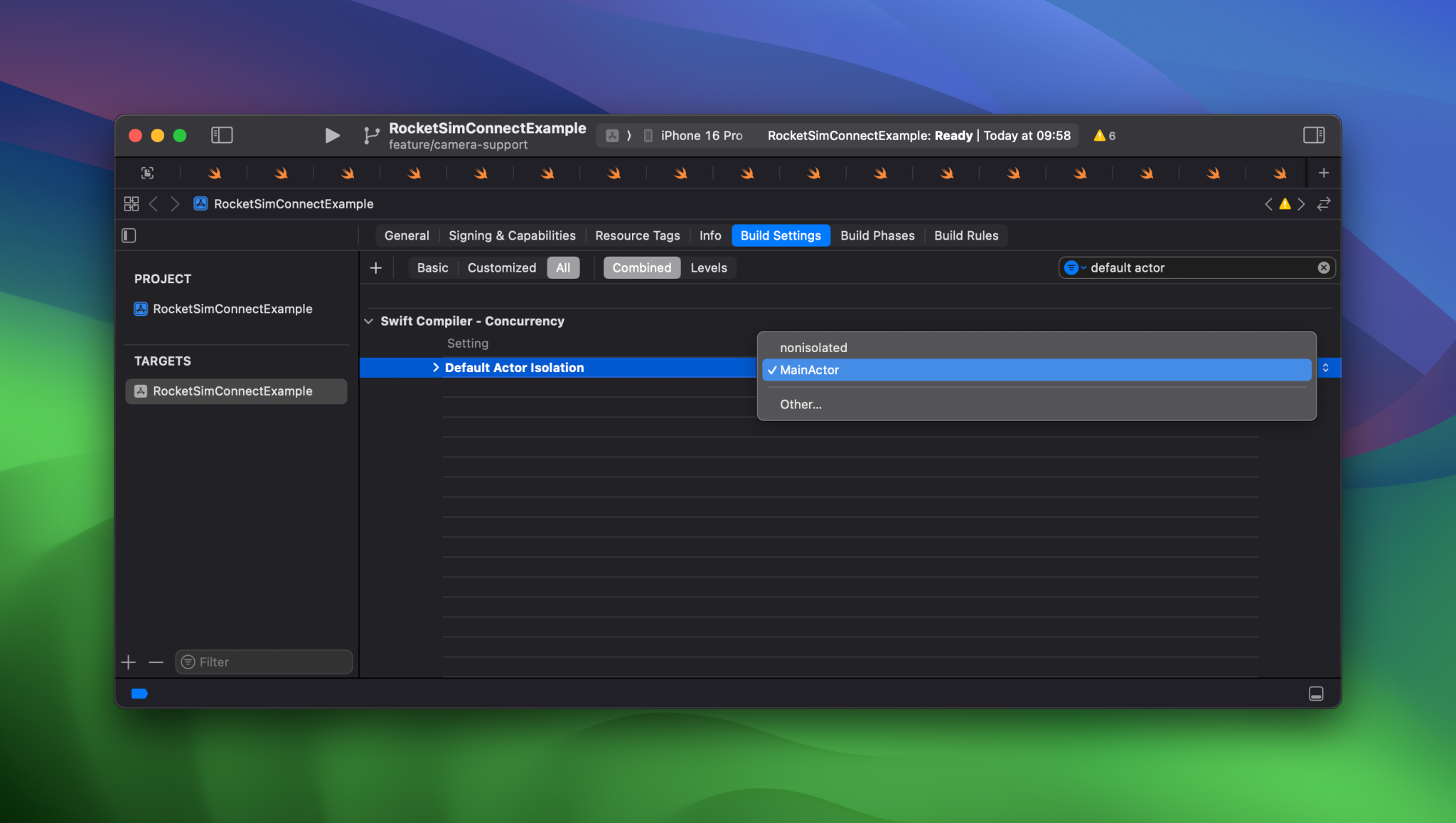
You can change the default actor isolation inside Xcode’s build settings.
The default for new projects since Xcode 26 will be MainActor.
For Swift packages, you can define this using a SwiftSetting as you might be used to already:
extension SwiftSetting {
    @available(_PackageDescription, introduced: 6.2)
    public static func defaultIsolation(
        _ globalActor: MainActor.Type?,
        _ condition: BuildSettingCondition? = nil
    ) -> SwiftSetting
}
Note that you can only provide nil or MainActor.self.
Do I need to configure this once or per package?
The setting works on a module-by-module basis. You’ll have to opt in explicitly for each package or project.
This language dialect was a point of discussion when the proposal was reviewed on the forums. Developers complained because you now need to know about the isolation domain to correctly predict the isolation domain for a method. The Swift team shared their vision on this in detail inside the vision document: Risks of a language dialect.
Will this change break all existing projects?
No, this feature is opt-in. If you don’t specify an explicit default isolation, the default isolation for the module is nonisolated.
Default actor isolation inference
To better understand the impact of changing the default isolation, it’s helpful to look at the following code example from the proposal. It shows the inferred actor isolation in comments, given the code is built with the @MainActor set as the default isolation:
// @MainActor
func f() {}

// @MainActor
class C {
    // @MainActor
    init() { ... }

    // @MainActor
    deinit { ... }

    // @MainActor
    struct Nested { ... }

    // @MainActor
    static var value = 10
}

@globalActor
actor MyActor {
    // nonisolated
    init() { ... }

    // nonisolated
    deinit { ... }

    // nonisolated
    static let shared = MyActor()
}

@MyActor
protocol P {}

// @MyActor
struct S: P {
    // @MyActor
    func f() { ... }
}
But hey, should I now use Xcode 26 or up for my migration?
I would say so, yes! However, your code won’t be backward compatible with older Xcode versions once you’ve changed the default isolation domain. This might be fine if you’re committing the migration to a separate branch while you await your entire team to switch to Xcode 26 or later.
Summary
Swift 6.2 introduced significant changes to Swift Concurrency, which impact how we handle warnings today. Changing the default isolation domain for applications to the main actor makes sense for many projects. It significantly reduces the number of warnings a project receives after enabling Swift 6 language mode.
That sums up the final lesson for this module. Get ready for the next assessment!