Swift Concurrency requires us to step away from a “threading mindset”—we give instructions of which methods should be asynchronous, but we don’t explicitly control on which thread something executes.
One thing we do control is telling which task has the highest priority. This can be used to ensure a task gets executed as quickly as possible. This would also be a potential take over if Task.yield() is used (more on yielding later in this module). Let’s dive in!
The default priority of a task
By default, when you create a new Task, it inherits the priority of the context it was created in. For example, if you start a task from a high-priority Task or an actor that’s executing on a high-priority thread, the new task will also inherit that priority.
However, if a task is created outside of any specific priority context—like in a detached Task.detached {}—it will use a default priority, which is typically .medium.
Let’s see this in action:
Task {
    print("Current task priority: \(Task.currentPriority)")
}
In this case, we’ve created a task without an explicit priority. It’s impossible to say what will be printed, as the context of where the Task is created can influence the default used priority. For example, tasks created from within a SwiftUI view will inherit the userInitiated priority, which equals the high priority.
To properly demonstrate the real fallback default value, we can make use of a detached task:
Task.detached {
    print("Default task priority: \(Task.currentPriority)")
    // Default task priority: TaskPriority.medium
}
While we can rely on the default priority in many cases, there are situations where explicitly setting a priority can be beneficial.
Configuring the priority of a task
To give a task a specific priority, you can provide a priority argument when creating it:
Task(priority: .background) {
    print("This task runs with a background priority: \(Task.currentPriority)")
}
Swift Concurrency offers several priority levels:
.userInitiated: Default for tasks triggered by user actions, like loading data..utility: Used for longer-running tasks that don’t require immediate results..background: Ideal for low-priority work like caching or prefetching..high: Used for tasks that require immediate user feedback..medium: Used for tasks that don’t require immediate results, similar toutility..low: Similar to the background priority.
Using task priorities correctly helps ensure that important work isn’t delayed by less urgent tasks. Note that it can be useful to look at the raw values of these priorities. For example:
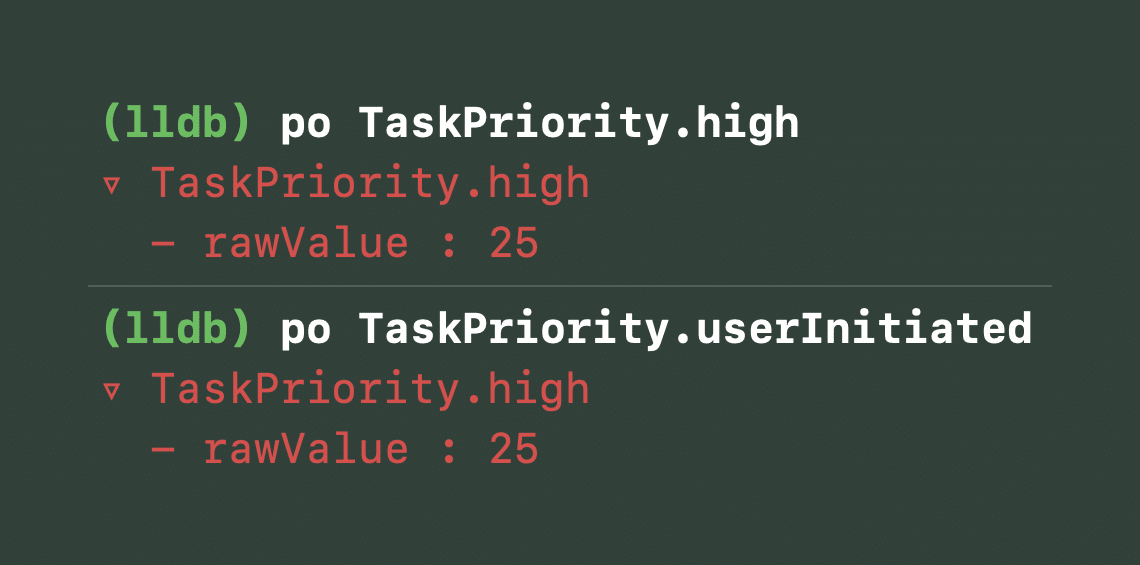
Printing out a specific priority can teach you about the underlying priority raw values.
We’ve printed out the high and userInitiated priorities and we notice that the underlying priority is equal. This could also mean that you expect a current priority of userInitiated while the debugger prints out high. We now know these are actually the same priorities. It’s not explicitly described in Apple’s documentation and the underlying values can be changed in the future, but it’s likely that we have the userInitiated case as a self-describing alternative for more readable code when requiring high priority work.
Understanding priority inheritance
Task priorities in Swift Concurrency don’t just apply at creation—they propagate through structured concurrency.
For example, if a parent task has a high priority, any child tasks it creates with async let or await will inherit that priority.
Task(priority: .high) {
    async let taskPriority = getCurrentTaskPriority()
    print("Async let executed with priority: \(await taskPriority)")
    // Prints: Async let executed with priority: TaskPriority.high
}

func getCurrentTaskPriority() -> TaskPriority {
    return Task.currentPriority
}
However, if you use Task.detached {}, the task does not inherit the priority. We expected this since we learned that unstructured detached tasks don’t inherit context:
Task(priority: .high) {
    await printDetachedTaskPriority()
}

func printDetachedTaskPriority() async {
    print("Current task priority: \(Task.currentPriority)")
    // Prints: Current task priority: TaskPriority.high

    Task.detached {
        print("Detached task priority: \(Task.currentPriority)")
        // Prints: Detached task priority: TaskPriority.medium
    }
}
This is important when spawning tasks that must be responsive—using Task.detached may unintentionally lower their priority.
How priorities affect the way tasks are scheduled
Task scheduling is influenced by the executor, which decides how priority information impacts execution order. While most executors try to run higher-priority tasks before lower-priority ones, the exact behavior depends on the platform and the specific Executor implementation.
Child tasks automatically inherit their parent task’s priority, ensuring that structured concurrency maintains a consistent execution flow. However, detached tasks don’t inherit any priority since they exist outside the task hierarchy.
There are cases where a task’s priority is temporarily elevated without actually changing its assigned priority:
- Actor-bound tasks: If a high-priority task is enqueued to an actor while the actor is already running a lower-priority task, the current task temporarily adopts the higher priority. This ensures that the queued task doesn’t experience unnecessary delays.
- Waiting on a result: If a high-priority task calls
.valueon another task’s result, the lower-priority task it depends on will temporarily run at the higher priority.
These priority adjustments help prevent priority inversion, where a low-priority task holds up the execution of a more critical one. By dynamically elevating priority when needed, the system ensures smoother and more predictable task execution.
What is an executor?
An executor in Swift Concurrency is responsible for scheduling and running tasks. It determines when and where a task executes, taking factors like priority into account. Executors play a key role in managing concurrency, ensuring that tasks run efficiently without unnecessary delays or priority inversions. By default, the Global Concurrency Pool is used as an executor. Actors have their own executor to ensure thread-safe access to its isolated state.
When you create an async task, it gets assigned to an executor. The executor decides when to run the task, considering factors like priority and resource availability. If a task runs inside an actor, the actor’s executor ensures that tasks execute sequentially to maintain safety.
Executors in Swift Concurrency prevent race conditions, optimize performance, and help us avoid priority inversions.
Priority Escallation
Up until Swift 6.1, it’s been impossible to escallate priority manually. This could be useful for tasks created outside of your control, for example, within an external package. Proposal SE-462 Task Priority Escalation APIs aims to solve this. The proposal is accepted and expected in a future Swift release, after which I’ll add a dedicated lesson accordingly. Stay tuned!
Summary
Task priorities allow you to control execution order, ensuring that critical tasks run as soon as possible. However, setting a priority does not guarantee execution order—it only gives a hint to the system.
When managing multiple concurrent tasks, it’s best to use the default priority inheritance as much as possible. Only override priority for tasks that truly need it and try to avoid detached tasks.
With that, let’s dive into yielding and sleeping tasks.