Before Swift Concurrency, many projects used closure-based solutions. While this worked fine, it could result in so-called Closure-hell, where you have closures within closures. Error handling in these closures became challenging as you often had to unwrap optionals, unless you could benefit from using the Result enum.
Many of you are familiar with converting closures into async/await syntax, so in this lesson, we’ll focus on techniques for doing so successfully.
Creating an async/await wrapper using Xcode’s refactoring tooling
When migrating code, it’s easy to dive deep into optimizing it completely for Swift Concurrency. However, you’re working with code that has proven to work fine for a while, so why not benefit from that stability?
You can do so by taking one step in between. Instead of rewriting the core logic into a Swift Concurrency alternative, you simply provide a wrapper around it. You can do so by using Xcode’s refactoring tooling.
In this example, we’re using the sample code method ImageFetcher.fetchImage. The method looks as follows:
struct ImageFetcher {
    enum Error: Swift.Error {
        case imageConversionFailed
    }

    func fetchImage(urlRequest: URLRequest, completion: @escaping @Sendable (Result<PlatformImage, Swift.Error>) -> Void) {
        let task = URLSession.shared.dataTask(with: urlRequest) { imageData, _, error in
            do {
                if let error = error {
                    throw error
                }

                guard let imageData = imageData, let image = PlatformImage(data: imageData) else {
                    throw Error.imageConversionFailed
                }

                completion(.success(image))
            } catch {
                completion(.failure(error))
            }
        }
        task.resume()
    }
}
Make sure to put your cursor on the method name itself and right-click to navigate to refactoring options:
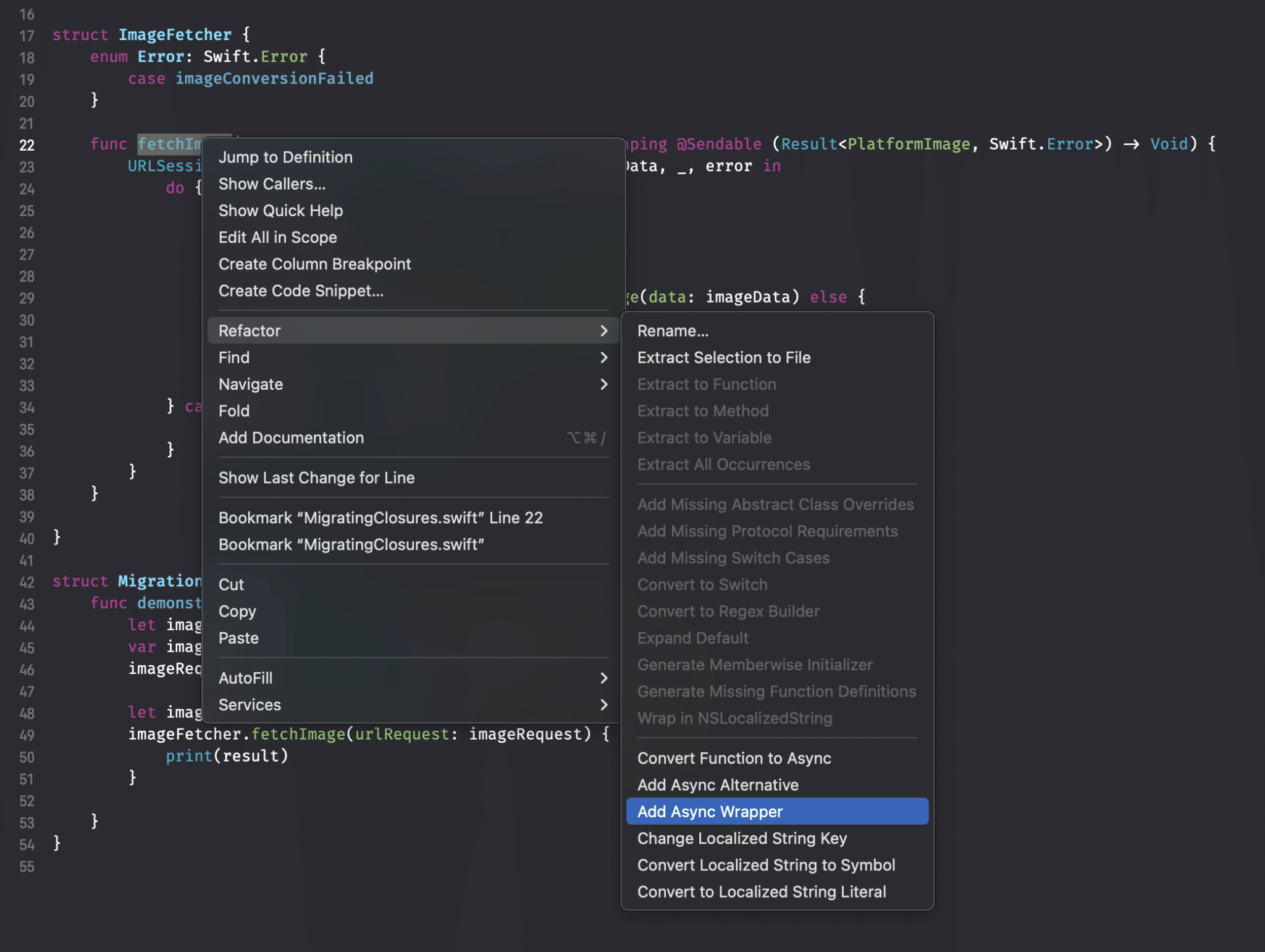
Note that we’re skipping the two other refactoring methods:
- Convert Function to Async: This attempts to refactor your whole method into an async/await alternative. We will use this method at a later point in this lesson.
- Add Async Alternative: Performs the same as the previous one, but as an alternative method. The original method remains in place
- Add Async Wrapper: Wraps the current closure-based method into an async/await alternative.
For now, we’ll focus on the latter. Performing this refactor results in the following output:
@available(*, renamed: "fetchImage(urlRequest:)")
func fetchImage(urlRequest: URLRequest, completion: @escaping @Sendable (Result<PlatformImage, Swift.Error>) -> Void) {
    URLSession.shared.dataTask(with: urlRequest) { imageData, _, error in
        do {
            if let error = error {
                throw error
            }

            guard let imageData = imageData, let image = PlatformImage(data: imageData) else {
                throw Error.imageConversionFailed
            }

            completion(.success(image))
        } catch {
            completion(.failure(error))
        }
    }
}

func fetchImage(urlRequest: URLRequest) async throws -> PlatformImage {
    return try await withCheckedThrowingContinuation { continuation in
        fetchImage(urlRequest: urlRequest) { result in
            continuation.resume(with: result)
        }
    }
}
You might recognize this code from a previous lesson in this module. If you do, you know that we want to update the available attribute to something like:
@available(*, deprecated, renamed: "fetchImage(urlRequest:)", message: "Consider using the async/await alternative.")
Doing so makes sure a warning pops up in places where the method is used:

Now that we have this wrapper in place, we can first focus on updating the caller sides. This is ideal, since we don’t have to worry about the underlying implementation. We can just focus on migrating existing code to the async/await alternative without worrying whether our underlying implementation logic still works.
Similarly, this allows you to update any existing tests to work with the async alternative. This is especially beneficial, as it prepares you to perform the actual conversion into a Swift Concurrency alternative.
Converting a closure-based method to an async alternative
At this stage, you’ve updated your code and tests to work with the async wrapper. The next step is to rewrite the core logic into an optimized version for Swift Concurrency. While you can do this manually, it’s much quicker to benefit from Xcode’s refactoring tooling.
Note
While testing the refactoring in several Xcode versions, I found them to be quite unstable. You would often run into an error like: Refactoring failed Connection interrupted. I have not seen a consistent solution to this issue, but some users report that performing a clean build and restarting Xcode after clearing the derived data folder for their project helps. In my case, it was caused by using shorthand if statements. The more complex your method, the more likely it fails. I’ve reported this to Apple (FB18528276).
As described before, we have two options: an async alternative or rewriting the existing method completely. I’d suggest picking your preference, but the async alternative might be helpful since you can easily compare both implementations.
Using the Add Async Alternative refactor method for our code example, we will get the following output:
struct ImageFetcher {
    enum Error: Swift.Error {
        case imageConversionFailed
    }

    @available(*, renamed: "fetchImage(urlRequest:)")
    func fetchImage(urlRequest: URLRequest, completion: @escaping @Sendable (Result<PlatformImage, Swift.Error>) -> Void) {
        Task {
            do {
                let result = try await fetchImage(urlRequest: urlRequest)
                completion(.success(result))
            } catch {
                completion(.failure(error))
            }
        }
    }


    func fetchImage(urlRequest: URLRequest) async throws -> PlatformImage {
        return try await withCheckedThrowingContinuation { continuation in
            let task = URLSession.shared.dataTask(with: urlRequest) { imageData, _, error in
                do {
                    if let error = error {
                        throw error
                    }

                    guard let imageData1 = imageData, let image = PlatformImage(data: imageData1) else {
                        throw Error.imageConversionFailed
                    }

                    continuation.resume(with: .success(image))
                } catch {
                    continuation.resume(with: .failure(error))
                }
            }
            task.resume()
        }
    }
}
This results in a slightly different output than our async wrapper, but not much of an improvement. The code is still based on the closure-based URLSession method, so we know we can do better.
Using the Convert Function to Async refactor method results in the following output:
func fetchImage(urlRequest: URLRequest) async throws -> PlatformImage {
    return try await withCheckedThrowingContinuation { continuation in
        let task = URLSession.shared.dataTask(with: urlRequest) { imageData, _, error in
            do {
                if let error = error {
                    throw error
                }

                guard let imageData1 = imageData, let image = PlatformImage(data: imageData1) else {
                    throw Error.imageConversionFailed
                }

                continuation.resume(with: .success(image))
            } catch {
                continuation.resume(with: .failure(error))
            }
        }
        task.resume()
    }
}
While we end up with just a single method, you can see that we’re still using the closure-based variant of URLSession. In other words, using Xcode’s refactoring tooling might not deliver what you need.
Xcode 26 could change this with its AI implementation, but for now, I’d like to suggest to rewrite manually instead.
Manually rewriting to async/await
Rewriting existing methods to async/await is a case-by-case scenario. While I will provide you an example for our image fetcher code, it’s probably not covering all the cases you will run into. It’s impossible for me to cover all these cases, but hopefully, this lesson will give you an idea of what steps you’ll need to take.
The final async alternative could look something like this:
struct ImageFetcherMigrated {
    enum Error: Swift.Error {
        case imageConversionFailed
    }

    func fetchImage(urlRequest: URLRequest) async throws -> PlatformImage {
        let (data, _) = try await URLSession.shared.data(for: urlRequest)
        guard let image = PlatformImage(data: data) else {
            throw Error.imageConversionFailed
        }
        return image
    }
}
Swift Concurrency shines as we have way less code to write and maintain. It’s easy to reason about the logic and we end up with a similar implementation as before, but using Swift Concurrency.
As you can see, the method definition matches the asynchronous wrapper we’ve created in the first place. In other words, you can remove that wrapper and use this final implementation instead. If you’ve updated your tests to work with the wrapper before, you can now re-run those tests to see if everything remains working.
Summary
Rewriting closure-based code to Swift Concurrency is best done by starting with an async wrapper. This wrapper allows you to migrate all code at the caller side and make tests succeed using async/await. Once your tests work again, you can focus on writing the actual asynchronous alternative.
In the next lesson, we’re going to look into the @preconcurrency attribute.