Swift’s introduction of async/await marked a significant evolution in how we write asynchronous code. By replacing completion handlers with a more readable and structured approach, Swift Concurrency makes it easier to reason about code execution and manage asynchronous operations safely. In this lesson, you’ll learn the fundamentals of async/await and how you can write async methods yourself.
Declaring an asynchronous function using async
To define an asynchronous function using Swift Concurrency, you need to mark your functions with the async keyword:
func fetchImages() async -> [UIImage] {
    // .. perform data request
}
In case your method can fail, you can add the throws keyword just like you would with a regular method:
func fetchImages() async throws -> [UIImage] {
    // .. perform data request
}
You could argue that the async keyword is the only difference between a synchronous and an asynchronous method. This makes writing asynchronous code using Swift Concurrency much more approachable compared to writing closure-based logic:
func fetchImages(_ completion: @escaping (_ result: Result<[UIImage], Error>) -> Void) {
    // .. perform data request
}
On top of that, you might notice a significant benefit of using Swift Concurrency in the above example. It’s easy to forget to call the completion handler when using closures. In case of the concurrency example, the compiler will force us to return a result in all cases:

Returning a result will be enforced when using Swift Concurrency over closures..
Calling an async function
After defining your async method, it’s time to call it from a synchronous context. You can do this by using a so-called Task object:
Task {
    let imageFetcher = ImageFetcher(imageURLs: [
        // some image URLs
    ])

    let images = try await imageFetcher.fetchImages()
}
For this example, I’ve wrapped our image fetching method into an ImageFetcher object:
struct ImageFetcher {

    let imageURLs: [URL]

    func fetchImages() async throws -> [UIImage] {
        // .. perform data request

        return []
    }
}
We haven’t discussed Task objects in Swift Concurrency yet, but we’ll dive into more details later in this course. For now, it’s enough to know that you need a Task to create an asynchronous context within a synchronous context.
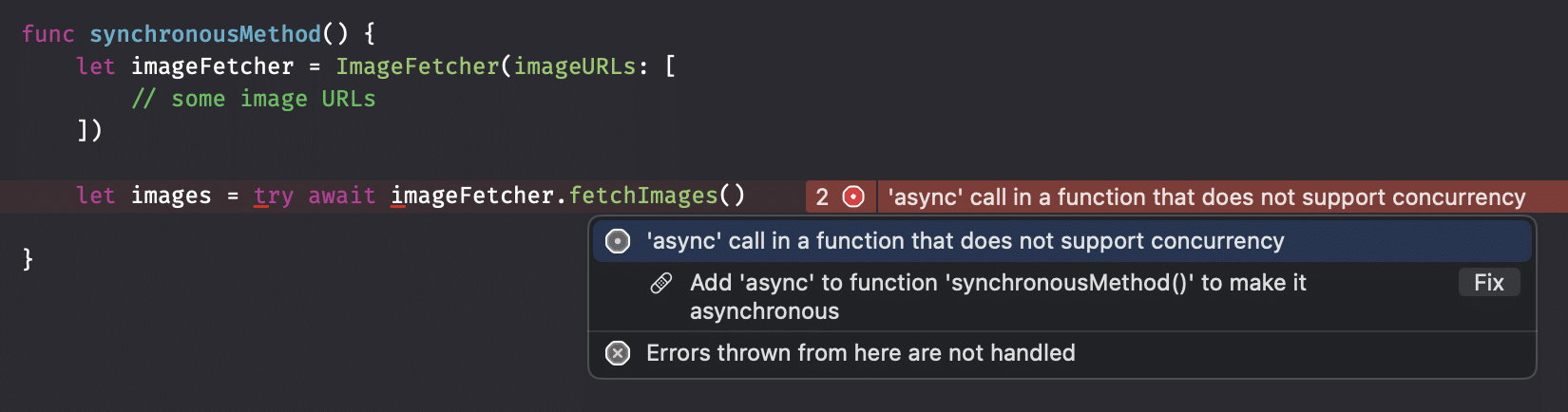
If you don’t use a Task, you’ll run into an error like this:
A closer look at these concurrency keywords
We’ve now defined an asynchronous method and called it accordingly. This brings us to the key takeaways—or maybe better—keywords to summarize:
asyncindicates the function performs asynchronous work.awaitpauses execution until the asynchronous function returns.throwsis used to propagate errors, making error handling more natural.
Summary
An asynchronous method in Swift Concurrency looks similar to a synchronous method. The key difference is the usage of the async and await keywords instead of having to deal with closures.
In the next lesson, we’ll look into the order of execution when using multiple async methods.