One of the most common places to start using async/await is by performing a network request. The recommended way of doing so is by using URLSession. After completing a request, you want to properly handle failures and decode the JSON into a Decodable structure.
In this lesson, we’ll convert an old-fashioned closure-based network request into a version that uses async/await.
Looking at an old-fashioned closure-based network request
Before we start writing a networking request using async/await, we will have a look at a closure-based example. In this lesson, we’re going to make use of httpbin.org, which is a free resource for testing requests. For example, you can POST data to [https://httpbin.org/post](https://httpbin.org/post) and it will return the data in the following response:
{
  "args": {},
  "data": "{\"name\":\"Antoine van der Lee\",\"age\":34}",
  "files": {},
  "form": {},
  "headers": {
    "Content-Length": "39",
    "Content-Type": "application/json; charset=utf-8",
    "Host": "httpbin.org",
    "User-Agent": "RapidAPI/4.2.8 (Macintosh; OS X/15.1.1) GCDHTTPRequest",
    "X-Amzn-Trace-Id": "Root=1-67b71921-1f22615333d2eef537e394dd"
  },
  "json": {
    "age": 34,
    "name": "Antoine van der Lee"
  },
  "origin": "XX.XX.XX.XX",
  "url": "https://httpbin.org/post"
}
As you can see, we can use the returned json parameter to decode the response we’ve sent. Perfect for this coding exercise!
For the closure-based example, we define a new method inside an APIProvider structure:
struct APIProvider {
    func performPOSTURLRequest(completion: @escaping (Result<PostData, NetworkingError>) -> Void) {
        // Networking logic will follow here
    }
}
Our next step is to configure the URLRequest with our parameters:
/// Configure the URL for our request.
let url = URL(string: "https://httpbin.org/post")!

/// Create a URLRequest for the POST request.
var request = URLRequest(url: url)
request.httpMethod = "POST"
request.setValue("application/json", forHTTPHeaderField: "Content-Type")

/// Define the struct of data and encode it to data.
let postData = PostData(name: "Antoine van der Lee", age: 34)

/// Configure the JSON body and catch any failures if needed.
do {
    request.httpBody = try JSONEncoder().encode(postData)
} catch let error as EncodingError {
    completion(.failure(.encodingFailed(innerError: error)))
    return
} catch {
    completion(.failure(.otherError(innerError: error)))
    return
}
Note that we’re making use of the following error enumeration and APIProvider struct as instance type:
enum NetworkingError: Error {
    /// Used in both async/await and closure-based requests:
    case encodingFailed(innerError: EncodingError)
    case decodingFailed(innerError: DecodingError)
    case invalidStatusCode(statusCode: Int)
    case requestFailed(innerError: URLError)
    case otherError(innerError: Error)

    /// Only needed for closure based handling:
    case invalidResponse
}
After defining the URLRequest, we can write all logic to perform the network request:
/// Use URLSession to fetch the data asynchronously.
URLSession.shared.dataTask(with: request) { data, response, error in
    do {
        if let error {
            throw error
        }

        guard let data, let httpResponse = response as? HTTPURLResponse else {
            throw NetworkingError.invalidResponse
        }

        guard (200...299).contains(httpResponse.statusCode) else {
            throw NetworkingError.invalidStatusCode(statusCode: httpResponse.statusCode)
        }

        let decodedResponse = try JSONDecoder().decode(PostResponse.self, from: data)
        print("The JSON response contains a name: \(decodedResponse.json.name) and an age: \(decodedResponse.json.age)")

        /// Make sure to send a completion with the success result.
        completion(.success(decodedResponse.json))
    } catch let error as DecodingError {
        completion(.failure(.decodingFailed(innerError: error)))
    } catch let error as EncodingError {
        completion(.failure(.encodingFailed(innerError: error)))
    } catch let error as URLError {
        completion(.failure(.requestFailed(innerError: error)))
    } catch let error as NetworkingError {
        completion(.failure(error))
    } catch {
        completion(.failure(.otherError(innerError: error)))
    }
}.resume()
To make this code example work, you’ll need the following two structures:
/// Define a struct to represent the data you want to send
struct PostData: Codable {
    let name: String
    let age: Int
}

/// Define a struct to handle the response from `httpbin.org`.
struct PostResponse: Decodable {

    /// In this case, we can reuse the same `PostData` struct as
    /// httpbin returns the received data equally.
    let json: PostData
}
The complete code example looks as follows:
/// Define a struct to represent the data you want to send
struct PostData: Codable {
    let name: String
    let age: Int
}

/// Define a struct to handle the response from `httpbin.org`.
struct PostResponse: Decodable {

    /// In this case, we can reuse the same `PostData` struct as
    /// httpbin returns the received data equally.
    let json: PostData
}

struct APIProvider {
    enum NetworkingError: Error {
        /// Used in both async/await and closure-based requests:
        case encodingFailed(innerError: EncodingError)
        case decodingFailed(innerError: DecodingError)
        case invalidStatusCode(statusCode: Int)
        case requestFailed(innerError: URLError)
        case otherError(innerError: Error)

        /// Only needed for closure based handling:
        case invalidResponse
    }
}

// MARK: - Using closures
extension APIProvider {
    func performPOSTURLRequest(completion: @escaping (Result<PostData, NetworkingError>) -> Void) {
        /// Configure the URL for our request.
        let url = URL(string: "https://httpbin.org/post")!

        /// Create a URLRequest for the POST request.
        var request = URLRequest(url: url)
        request.httpMethod = "POST"
        request.setValue("application/json", forHTTPHeaderField: "Content-Type")

        /// Define the struct of data and encode it to data.
        let postData = PostData(name: "Antoine van der Lee", age: 34)

        /// Configure the JSON body and catch any failures if needed.
        do {
            request.httpBody = try JSONEncoder().encode(postData)
        } catch let error as EncodingError {
            completion(.failure(.encodingFailed(innerError: error)))
            return
        } catch {
            completion(.failure(.otherError(innerError: error)))
            return
        }

        /// Use URLSession to fetch the data asynchronously.
        URLSession.shared.dataTask(with: request) { data, response, error in
            do {
                if let error {
                    throw error
                }

                guard let data, let httpResponse = response as? HTTPURLResponse else {
                    throw NetworkingError.invalidResponse
                }

                guard (200...299).contains(httpResponse.statusCode) else {
                    throw NetworkingError.invalidStatusCode(statusCode: httpResponse.statusCode)
                }

                let decodedResponse = try JSONDecoder().decode(PostResponse.self, from: data)
                print("The JSON response contains a name: \(decodedResponse.json.name) and an age: \(decodedResponse.json.age)")

                /// Make sure to send a completion with the success result.
                completion(.success(decodedResponse.json))
            } catch let error as DecodingError {
                completion(.failure(.decodingFailed(innerError: error)))
            } catch let error as EncodingError {
                completion(.failure(.encodingFailed(innerError: error)))
            } catch let error as URLError {
                completion(.failure(.requestFailed(innerError: error)))
            } catch let error as NetworkingError {
                completion(.failure(error))
            } catch {
                completion(.failure(.otherError(innerError: error)))
            }
        }.resume()
    }
}
That is quite some code for a single networking request! There are a few things to point out why it’s not optimal to use closure-based code for networking requests:
- Multi-layer error handling: since our response and error return in a new closure, we can catch all errors in a single place.
- Unwrapping optionals: due to the nature of closure-based requests, we need to deal with an optional error, data, and response property.
Enough reason to rewrite to async/await!
Rewriting the POST request to make use of async/await
I’m sure you can’t wait to start rewriting the method to async/await. We’ll do it manually for the sake of practice, but I do want to let you know that Xcode offers refactoring options:
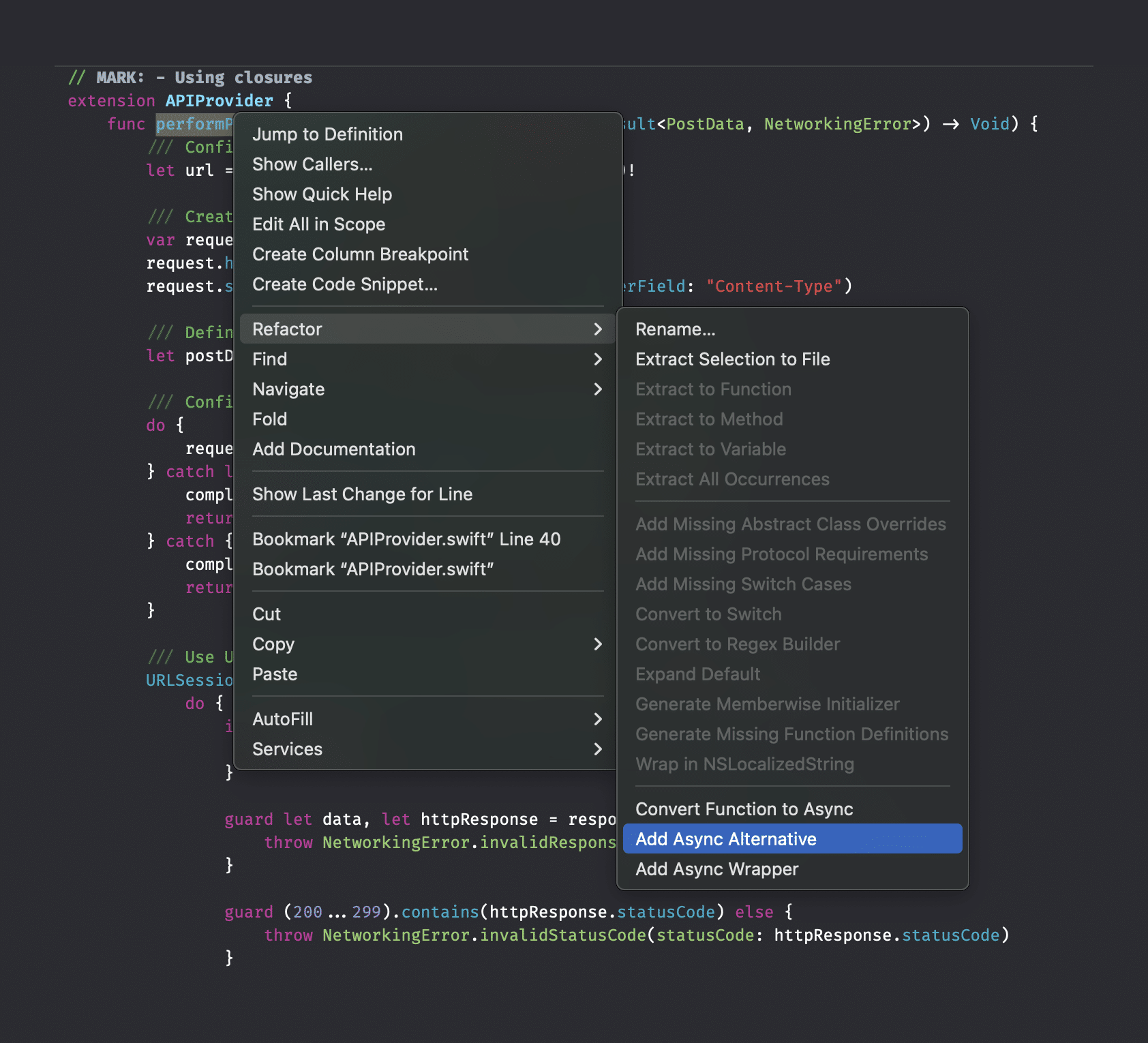
Xcode offers refactoring options for closure-based methods
Feel free to use it in this lesson and expect more about refactoring later in this course. However, I highly recommend trying to rewrite the method without Xcode’s help as you’ll better understand what it takes to refactor.
Rewriting the method definition
The first thing we’ll do is adding a new method to our APIProvider. That’s right: we’re not actually rewriting the existing closure method. This is the first migration tip I’m giving—since we’re adding a new method, it’s much easier to keep your code compiling successfully. If you’re able to use the compiler, you’ll also be able to benefit from early feedback and code improvements.
The method definition looks as follows:
func performPOSTURLRequest() async throws(NetworkingError) -> PostData
And to make it easy to compare, here’s the old closure-based one:
func performPOSTURLRequest(completion: @escaping (Result<PostData, NetworkingError>) -> Void)
There are a few important differences:
- We now make use of
asyncin our method definition - Instead of a closure result, we’re now returning
PostDatadirectly - The thrown error is set to a specific type of
NetworkingError. Note that this is a Swift 6 feature (you can learn more about it here)
Defining the URLRequest logic
Just like with the closure-based example, we’re going to create a URLRequest instance first:
/// Configure the URL for our request.
let url = URL(string: "https://httpbin.org/post")!

/// Create a URLRequest for the POST request.
var request = URLRequest(url: url)

/// Configure the HTTP method.
request.httpMethod = "POST"

/// Configure the proper content-type value to JSON.
request.setValue("application/json", forHTTPHeaderField: "Content-Type")

/// Define the struct of data and encode it to data.
let postData = PostData(name: "Antoine van der Lee", age: 33)
let jsonData = try JSONEncoder().encode(postData)

/// Pass in the data as the HTTP body.
request.httpBody = jsonData
You’ll quickly notice a compiler error after adding this logic:

This is because we’ve configured a typed error of NetworkingError in our method definition. Therefore, you’ll have to use a do-catch combination inside your method:
extension APIProvider {
    func performPOSTURLRequest() async throws(NetworkingError) -> PostData {
        do {
            /// Configure the URL for our request.
            let url = URL(string: "https://httpbin.org/post")!

            /// Create a URLRequest for the POST request.
            var request = URLRequest(url: url)

            /// Configure the HTTP method.
            request.httpMethod = "POST"

            /// Configure the proper content-type value to JSON.
            request.setValue("application/json", forHTTPHeaderField: "Content-Type")

            /// Define the struct of data and encode it to data.
            let postData = PostData(name: "Antoine van der Lee", age: 33)
            let jsonData = try JSONEncoder().encode(postData)

            /// Pass in the data as the HTTP body.
            request.httpBody = jsonData
        } catch let error as DecodingError {
            throw .decodingFailed(innerError: error)
        } catch let error as EncodingError {
            throw .encodingFailed(innerError: error)
        } catch let error as URLError {
            throw .requestFailed(innerError: error)
        } catch let error as NetworkingError {
            throw error
        } catch {
            throw .otherError(innerError: error)
        }
    }
}
Typed errors are great at the implementation level, but require more work when defining the method. Yet, your colleagues will be happy to know precisely which errors to expect 😉
Performing the request using async/await
After we’ve configured the URLRequest, we can start writing the URLSession logic. Apple provided async/await alternatives for all closure-based APIs and has first-class support for all URLSession methods you’re used to. Therefore, we can write the request as follows:
/// Use URLSession to fetch the data asynchronously.
let (data, response) = try await URLSession.shared.data(for: request)
The best thing is that we no longer have an optional data and response property. Secondly, the data(for:) method will throw an error automatically if anything goes wrong.
Now that we have the response data available, we can do some final checks:
guard let statusCode = (response as? HTTPURLResponse)?.statusCode else {
    throw NetworkingError.invalidStatusCode(statusCode: -1)
}

guard (200...299).contains(statusCode) else {
    throw NetworkingError.invalidStatusCode(statusCode: statusCode)
}
Followed by decoding the response:
/// Decode the JSON response into the PostResponse struct.
let decodedResponse = try JSONDecoder().decode(PostResponse.self, from: data)

print("The JSON response contains a name: \(decodedResponse.json.name) and an age: \(decodedResponse.json.age)")
At this point, we’re happy that we can benefit from compiler feedback. In the closure-based example, we would not be notified if we forgot to call the completion handler. However, using async/await, the compiler will show an error if we don’t return a value:
 Missing return in instance method expected to return ‘PostData’
That means we need to finish our method by returning the decodedResponse property and we’ve completed the migration:
// MARK: - Using async/await
extension APIProvider {
    func performPOSTURLRequest() async throws(NetworkingError) -> PostData {
        do {
            /// Configure the URL for our request.
            let url = URL(string: "https://httpbin.org/post")!

            /// Create a URLRequest for the POST request.
            var request = URLRequest(url: url)

            /// Configure the HTTP method.
            request.httpMethod = "POST"

            /// Configure the proper content-type value to JSON.
            request.setValue("application/json", forHTTPHeaderField: "Content-Type")

            /// Define the struct of data and encode it to data.
            let postData = PostData(name: "Antoine van der Lee", age: 33)
            let jsonData = try JSONEncoder().encode(postData)

            /// Pass in the data as the HTTP body.
            request.httpBody = jsonData

            /// Use URLSession to fetch the data asynchronously.
            let (data, response) = try await URLSession.shared.data(for: request)

            guard let statusCode = (response as? HTTPURLResponse)?.statusCode else {
                throw NetworkingError.invalidStatusCode(statusCode: -1)
            }

            guard (200...299).contains(statusCode) else {
                throw NetworkingError.invalidStatusCode(statusCode: statusCode)
            }

            /// Decode the JSON response into the PostResponse struct.
            let decodedResponse = try JSONDecoder().decode(PostResponse.self, from: data)

            print("The JSON response contains a name: \(decodedResponse.json.name) and an age: \(decodedResponse.json.age)")

            return decodedResponse.json
        } catch let error as DecodingError {
            throw .decodingFailed(innerError: error)
        } catch let error as EncodingError {
            throw .encodingFailed(innerError: error)
        } catch let error as URLError {
            throw .requestFailed(innerError: error)
        } catch let error as NetworkingError {
            throw error
        } catch {
            throw .otherError(innerError: error)
        }
    }
}
Summary
Migrating a URLSession request into async/await shows how more readable code becomes after stepping away from old-fashioned closures. You’ll automatically make fewer mistakes due to the compiler helping out, and there are fewer optional properties to handle.
This was the final lesson of the async/await basics module. Time for an assessment to validate your learnings.